Stuck?  support@mecway.com
support@mecway.com

Mecway
FEA
Alibre Assy File Error

Just a few days ago I read of the integration between Alibre and Mecway (I'm slow to the party). Great news for all... except I can't get the assemblies to import without an error. Individual part files import and mesh fine, but assemblies show an error on each part of the assembly (see attached).
What am I doing wrong? Thanks.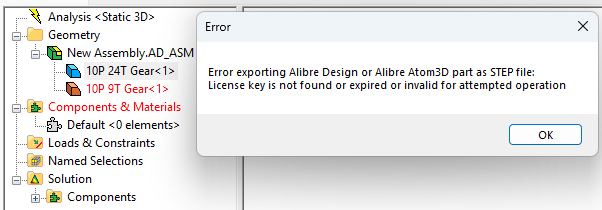
What am I doing wrong? Thanks.
Howdy, Stranger!
It looks like you're new here. If you want to get involved, click one of these buttons!
Comments
The 2nd line of that message comes from Alibre so it would refer to the Alibre license key. Some ideas beyond making sure an Alibre license is activated:
Maybe you have multiple versions of Alibre Design installed and Mecway is linked to an unlicensed one. Confirm the version number in Tools -> Options -> Alibre.
Try to export an assembly as STEP file directly from the Alibre GUI to see if it's a broader problem.
I'm hoping this is not one of those diabolical issues that computers sometimes have. See attachment.
I'll get back to you about providing a fix.